Full-site Translation,
AI reads the entire page before writing
Most translation tools process one entry at a time, leaving menus translated in ways that make little sense. We hand the fully rendered page to AI, allowing it to see the heading above a button and the paragraph below before deciding how that button should be translated.
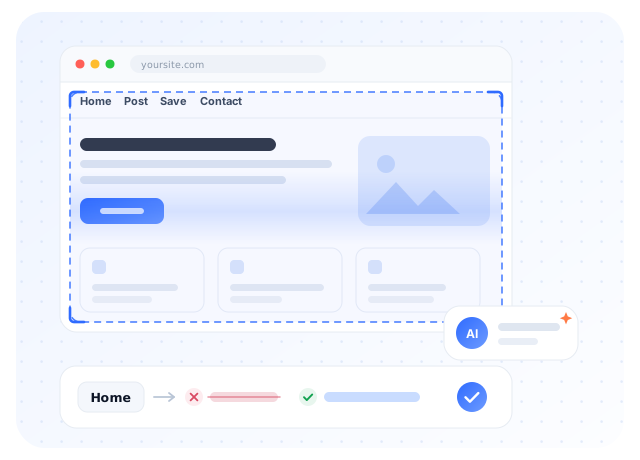
The fully rendered page is passed to the model as a whole, so it can see the relationships between buttons, menus, and paragraphs.
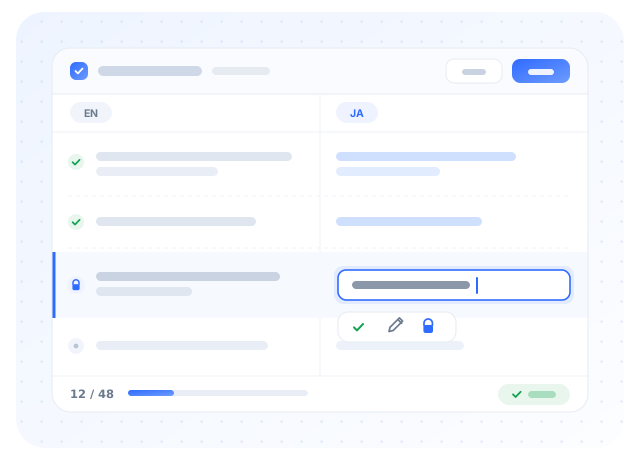
Modify any translation you're not satisfied with; edited sentences are locked and won't be overwritten on the next run.
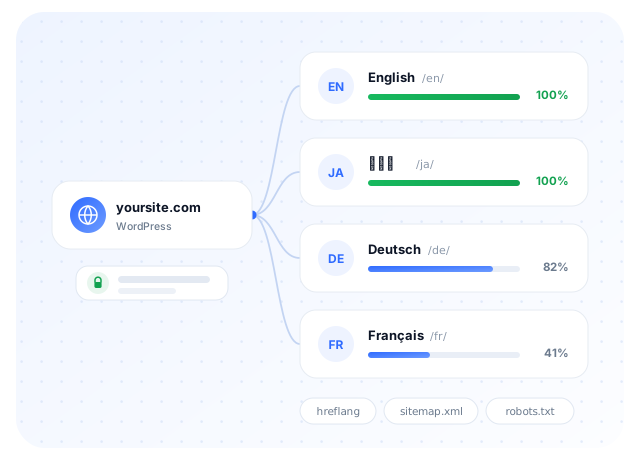
One directory per language, with hreflang, sitemap, and robots generated together. The original text remains unchanged.
Same Menu, Two Translations
When translating items one by one, the engine sees only a single word and has to guess. Guess wrong, and your menu becomes gibberish to target-language users.
AI translation isn't always perfect, which is why there's also a page-by-page proofreading interface — any edits you make won't be overwritten in future translations.
Three Steps to a New Language for Your Website
 1
1
Install the Plugin
Install and activate the plugin from the WordPress admin panel—no need to modify your theme or posts.
 2
2
Enter Your License Key
After purchasing a plan, you'll receive a license key to paste into the plugin settings. No API key from any AI platform is required.
 3
3
Start Translating
Choose your target language and click Translate. You can let it run in the background or have it translate on demand when visitors arrive.
It's more than just swapping words for another language
Translation happens after WordPress finishes rendering, so it covers far more than just "translating posts."
Full-page context translation
Pass the fully rendered page to the model so it can see the relationships between headings, buttons, and paragraphs, rather than guessing word by word.
Page-by-page proofreading
Side-by-side original and translated text. Edit any translation you're not satisfied with. Your changes will be saved and not overwritten on next run.
Three translation timing options
Manually flip through pages, run in bulk in the background, or translate on demand when visitors arrive. You can also set a translation completeness threshold before content is made public.
Per-Page Locking and Concurrency
Two editors working at the same time won't flip the same page twice or double your bill; different pages are handled in parallel without queuing.
URL path translation
Internal links automatically point to the corresponding language version, and the paths themselves can be translated while still resolving correctly back to the original articles.
Multilingual SEO
hreflang (including x-default and regional variants), sitemap localization, and per-language Sitemap lines in robots.txt.
Glossary replacement rules
Tired of brand names and proper nouns getting mistranslated? Configure per-language replacement rules with support for plain text, exact match, and regex.
Language Switcher
A draggable floating button with position memory; you can also specify a container ID to style it yourself, and the flag icon can be turned off.
Easily Overlooked Spots
Because translation happens after the page has fully rendered, buttons in themes, widget titles, and image alt texts are all processed as well — which is exactly what article-only translation plugins tend to miss.
View Full FeaturesSubscribe by period, upgrade anytime
AI translation costs are already covered by your subscription fee—no additional charges for model calls.
- Every months 10,000,000 tokens translation quota
- Up to 1 sites
- Full translation features, no feature limitations
- Page-by-page proofreading and terminology replacement
- Every year(s) 100,000,000 tokens translation quota
- Up to 3 sites
- Full translation features, no feature limitations
- Page-by-page proofreading and terminology replacement
Running out of quota during the cycle? You can add a quota package separately, which arrives immediately and does not expire. Learn about add-to-cart
What You Might Want to Know Before Subscribing
Make your website speak another language
Install the plugin, enter a license key, and let it handle the rest.